NtpDate: Plug-in for Enigma2
Version 0.1.4 (August 2012) |
 |
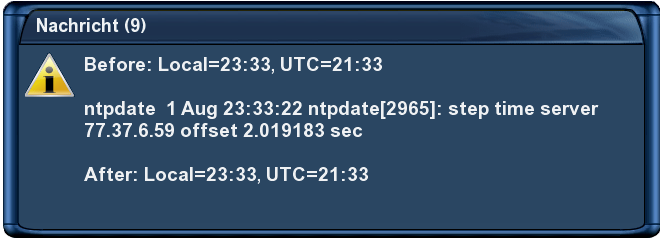 |
This is a plug-in for Enigma 2, which allows configuring and using a
time server from the internet to set the internal clock at startup and now also via
timer again every few hours while the box is running.
This can be used instead of or besides fetching the actual time at startup from the
actual TV channel / transponder. Some transponders have the wrong time (or time zone).
The versions till 0.1.3 of the tool have had an issue with EPG: If the setup of the
time from the transponder was switched off, then EPG didn't show any info after a cold
boot. If both ways to set the time have been active, the autostart of this tool with setup
of the clock from internet was done before the setup of the possibly wrong time from the
transponder. A workaround was to re-boot the GUI via the menu. Now with version 0.1.4 the
EPG is told with an eDVBLocalTimeHandler.getInstance().setUseDVBTime(True) command that the
clock is set and then EPG seems to work correct, even if "Use Transponder Time" is switched off.
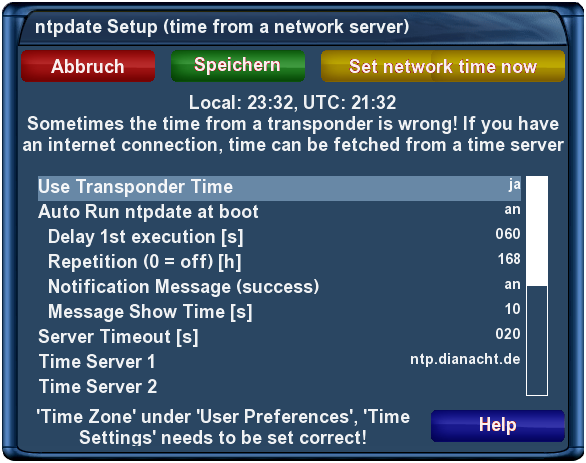
Now with version 0.1.4 also the eTimer from Enigma2 is used: The setup of the clock
via internet van be delayed a few seconds to behind the setup from the actual transponder.
So with both ways activated, Internet time has priority over transponder time. But if your
internet connection is interrupted, then the hopefully correct transponder time is used.
Additionally it's now possible, to regularly run ntpdate again (repetition every
few hours) to correct the time, while the box is running.
I don't know, which maximum time in milliseconds the eTimer really accepts. 1h = 3600s =
3600000ms is working well! 1 week = 168h = 604800s = 604800000 ms = 0x240C8400 ms??
Up to now you need to be a little familiar with ftp to install that
plug-in to your box. And of course you are doing all that manipulations
of the software on your box on your own risk.
Installation and setup:
- Download the NtpDate plug-in to your PC
and extract the files.
- Connect with an ftp tool (e.g. the Dreambox Control Center E2
"DCC-E2" or FireFox Add-On FireFTP may be used) to your QBoxHD
(Username: root, PW: qboxhd) and go to the plug-in folder, which is on
the QBoxHD /usr/local/lib/enigma2/python/Plugins/Extensions. Put the
downloaded files to a new folder NtpDate there.
- As in the Linux operating system there is the ntpdate binary
file missing, the tool brings this binary with them. If your box is not a
QBoxHD and it has a different processor, you may need to replace that
file by a binary suitable to your processor. E.g. for the Dreambox
DM500HD this seems necessary!
- Restart Enigma 2 (GUI restart) or alternatively reboot the whole Box
- In the plug-in Browser there should now be the new "ntpdate". If
your time zone is not "Central Europe", you need to delete the preset
time servers and to configure a free accessible time server of your
country or time zone and to configure that.
- Without a delay for the 1st execution the auto-run of ntpdate
comes before the time setup from the transponder and may overwrite then
the setting from ntpdate again with the wrong values from the transponder.
- Try it with the yellow button "Set network time now".
Deactivate:
If you want to use the transponder time instead of the network time
(e.g. to operate the box without internet):
- Turn on "Use Transponder Time"
- Turn off "Auto Run ntpdate at boot"
Still you can run ntpdate manually via the yellow button in the ntpdate
setup.
Uninstallation:
- Attention:
You should turn on "Use
Transponder Time" first via the setup of
NtpDate!
Workaround if you have forgotten this and the plug-in already
deleted:
- via telnet send an
init 4
- in the file
/etc/enigma2/settings change the config.misc.useTransponderTime from false to true
- via telnet send an
init 3
- Delete (via ftp or Telnet) the NtpDate folder, which you created
during setup.